VXDIAG VCX NANO 5054 ODIS V4.3.3

显示标签为“vas interface”的博文。显示所有博文

2016年8月7日星期日

VAS 5054A & UPA program VIN of VW10 airbag 5N0 pw NEA

Something about VW10 airbag 5N0 pw NEA VIN number setup (with VAS 5054A with ODIS 2.2.7 & UPA USB programmer), like wiring connection, access authorization, reading PIN and programming VIN number...
Disclaimer: TRY ON YOUR OWN RISK
Part 1 - devices and wiring connection
VW10 airbag & VAS5054A:

VAS 5054A and VW10 airbag wiring connection
Label 1:

Label 2:

VW10 airbag connector:

VW10 5N0 pin out connector
Wires pin connector:

UPA adapter vs eeprom programmer:
10 pin from UPA adapter goes to eeprom connector programmer right pin

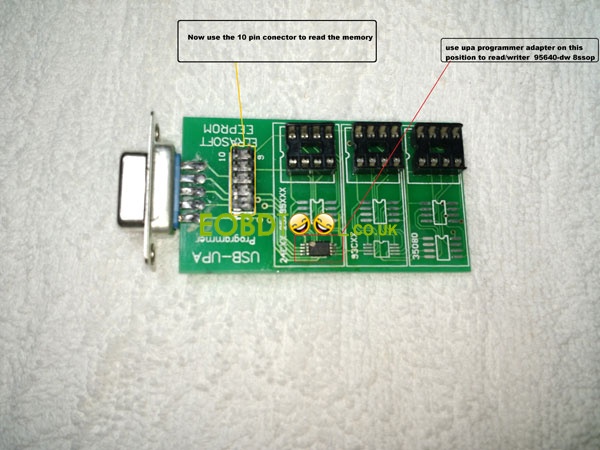
Upa adapter:
Use the 10 pin connector (marked with yellow) to read the memory
Use upa programmer adapter on the position (marked with red) to read/write 99640-dw 8ss0p

10 pin connector:

Eeprom programmer pin out:

Part 2 - setup on VAS 5054A software ODIS
Access authorization:
Doing this event in ODIS 2.27 interface for authorization editing vin on the control module

Access authorization login”

Select automatic access authorization
Adapt airbag software:

Select adapt airbag software
Coding after authorization:

New codes here
Done!:
The connect vehicle identification number cannot be read from the engine control module.
Please enter vin number...

Fault free:
After you programming VIN number, you will see no more error codes here

On table:
There is only one control because of only the airbag control module on the table test

Vin 2:
Done
Go to read fault codes and see no more 0003 control module defective

Vin 3:
Click Done/Continue to go on

Vin 4:
Control module data is collecting..

Vin appear:
The connect vehicle identification number cannot be read from the engine control module.
Please enter vin number...

Vin input:
Input the vin number here

Attachment:

2016年6月8日星期三

5054A ODIS 2.0 license error - Could not parse certificate (fixed)

Received complaint from a customer with VAS 5054A plus..said his ODIS 2.2 came with license error.. Then obdtool engineer helped to solve it.
ODIS 2.0 error message:
OffboardDiagLauncher 0.239.846
Error reading the license file: Could not parse certificate: java.io.IOException: Empty input
This license is invalid

Solution:
- Setup Date on your laptop: 01/01/2015
- Re-install laptop operating system: use Windows XP O.S.:
http://www.chinaautodiag.com/html/ghost-windows-xp-professional-sp3-free-download-and-installation-6476.html
Relate products:
Best Quality VAS 5054A ODIS V3.0.3 Bluetooth Diagnostic Tool With OKI Chip UDS Protocol for VW Audi Skoda Seat:


2015年10月15日星期四

3C-Passat 2006 Diagnose by Newest VAS 5054A V2.26

This is the case we successfully tested on 3C-Passat 2006 with the latest ODIS 2.26 for VAS 5054A.
Computer requirement:
Windows XP/ Wind 7 System
Steps:
Open Offborad Diagnostic Information System on Desktop
Read Warnings, and then scroll down it and click OK.
Click the last line Starting diagnosis.

Check if the ignition is switched on in the vehicle. Click Continue.
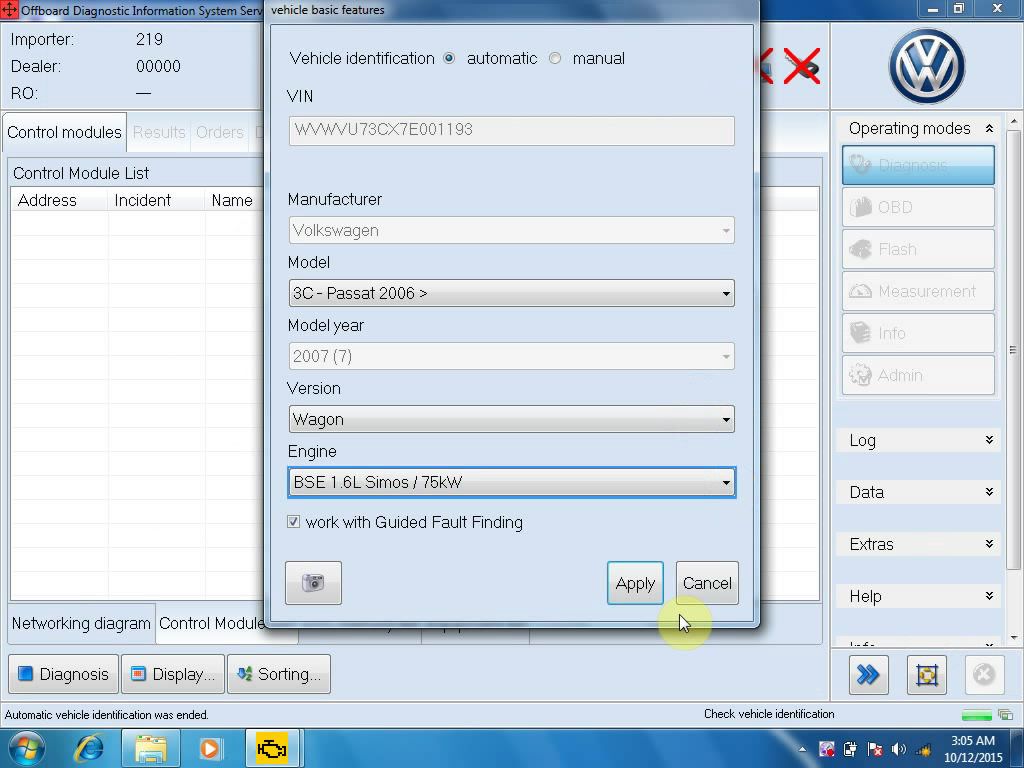
Finish the vehicle basic feature. Click Apply.
Select the first line and click No RO.

Click Networking diagram, then click the content.
Click continue to enter diagnosis.


Click MOT_O1.

Click Control Module List

Click DTC memory to read, and click the first line”Engine Control Module 1”, then Diagnosis.

Click Yes to cancel diagnostic entrance.
Click the cross button under the operating modes.
Click Yes to end.
Done.
Ps. The latest software ODIS 2.26 only compatible with the following 5054A:
Best Quality VAS 5054A

2015年10月14日星期三

Newest VAG Scanner VAS 5054A ODIS V2.26 Released!!

Hello, all!! Here comes the newest version of VAS 5054A ODIS 2.26. This is a detailed introduction of 5054A 2.26.


What’s new in VAS 5054A V2.26?
- Estimated remaining times are shown for ECU flash operations.
- Diagnostic protocol contains interruptions of GFF sessions, extended measurement values, improved ECU communication view, used diagnostic hardware, connection type of diagnostic hardware, operating system, the hotfix used and submissions of support requests
- The measured value display has been improved.
- Documents in GFF are displayed in separate windows.
- One message box will be shown at the beginning of the test drive mode.
- GFF hotfixes can be integrated during diagnostic sessions.
- Danger messages have been revised.
- Stopping of diagnostic sessions may be interrupted.
- Automatic deletion of autosave diagnostic protocols after successful transmission.
- Selection of PassThru diagnostic hardware has been improved.
- ODIS Service Software update has been stabilized.

Which 5054A device available for ODIS 2.26?
sp33-c(Best Quality VAS 5054A ODIS V2.0 / V2.02)


VAS 5054A V2.26 ODIS for VW Audi Seat Skodasoftware display:


 5054A PCB board:

2015年9月27日星期日

2015 New VAS 5054a Plus ODIS 2.0 with original HQ PCB

2015 VAG diagnostic scanner VAS 5054 Plus with HQ chip and original 5054a case are available in obdtool.co.uk. The new VAS5054a plus share the same software with vas 5054a Bluetooth, but differs in outlook and PCB board.

Difference vas 5054a and 5054 plus:

1) Vas5054a case/outlook


New VAS5054a Plus


2) PCB board differences:

Vas 5054a PCB board
SP33-C Blue PCB


SP33-B/SP33-BO Green PCB


New VAS 5054 Plus PCB board
Green HQ PCB
A-board: SP33-E3/SP33-E4 Bluetooth (OEM 2.0) chip, less stable
B-board: SP33-E/SP33-E1 High Quality Bluetooth (AMB 2300) chip, more stable


Software version:
ODIS 2.0 Multi-Language:
English/Japanese/Portuguese/Romanian/Korean/Dutch/Polish/Turkish/Spanish/French/Italian/Croatian/Danish/German/Swedish/Finnish/Slovenian/Czech/Russian/Greek/Chinese
ODIS 2.02 English/Chinese

Supported Multi-brand Car Models: For VW, AUDI, SKODA, SEAT, Bentley and Lamborghini

Connection: USB or Bluetooth connection

Computer requirement:
Windows System Language: American English
Windows XP (XP2/XP3)
System C:// have to be NTFS format
C:// need to have at least 40GB space for installing ODIS V2.0

 We can also offer free software V19 VAS, if you need, choose software V19 when ordering. V19 VAS Software can support the J1850 PWM protocol.

WIFI Version VXDIAG VCX NANO 5054 ODIS V3.03 Support UDS protocol et le français


2015年9月3日星期四

VAS 5054A ( Best Quality )

Best Quality VAS 5054A ODIS V2.0 / V2.02 Bluetooth Diagnostic Tool With OKI Chip UDS Protocol for VW Audi Skoda Seat:

Item No. SP33-C

History: 241 sold

Price:€88.00

VAS 5054A diagnostic tool Highlights:
1. Multi-languages:
English/Japanese/Portuguese/Romanian/Korean/Dutch/Polish/Turkish/Spanish/French/Italian/Croatian/Danish/German/Swedish/Finnish/Slovenian/
Czech/Russian/Greek/Chinese

2. Update via CD

3. With OKI Chip. Support UDS Protocol
4. Supported Car Models: VW, AUDI, SKODA, SEAT, Bently and Lamborghini
    If you need software for Bently and Lamborghini, please leave message in order

5. VAS 5054A Bluetooth Version, Password: 082145725


Tips on using VAS 5054A ODIS Interface:
1. VAS 5054A hardware support online coding, but our software does not support. Need get software from VW dealer for online coding function.
2. ODIS V2.02 Available Now, but there is only Chinese and English for V2.02 version, if you need multi languages, choose ODIS V2.0
3. If you need the software for Lamborghini, Bentley, please leave us information when order
4. Difference among VAS 5054A ODIS V2.0 and ODIS V2.02 software:
5054A VAG 2.0V5054A VAG 2.02V
LanguageMulti-LanguageEnglish and Chinese Only
Car listVW AUDI SKODA SEATVW AUDI SKODA SEAT
BluetoothYESYES
5. VAS 5054A ODIS Bluetooth Diagnostic Tool With OKI Chip
6. Difference among VAS 5054A
7.How to use The VAS 5054A ODIS V2.0

VAS 5054A V2.23:

VAS 5054A Software for Import VW Audi ODIS 2.23
VAS 5054A V2.02 System Requirements
Windows System Language: American English
Windows XP(xp2/xp3)
System C:// have to be NTFS format
C:// need to have at least 10GB space for installing VAS5054A


VAG 5054A Interface Diagnostic Tool Description (VAS 5054A introduction)

Bluetooth version

VAS 5054a is a universal diagnostic interface for the vehicles of the Volkswagen Group and all OBD vehicle systems from other manufacturers.
The integrated Bluetooth interface connects the vehicle with a notebook,desktop PC or test system.No cables are needed for vehicle diagnostics using the VAS 5054A VAG diagnostic tool.

The range of the wireless Bluetooth connection is 2 to 5 meters,depending on the environment and the type of Bluetooth adapter used on the PC side.
The Serial Port Profile (SPP) is used for data transfer via Bluetooth.Different Bluetooth security levels are supported.

Specification
The vehicle protocols are handled directly in the VAS 5054A ODIS Bluetooth.

This ensures fast response times and a reliable real-time behavior independently of the PC operating system. Every time a connection is established, the VAS 5054A interface software is identified with the version installed on the application PC. The VAS 5054A thus automatically adopts any new features provided after a new software version has been installed on the application PC.

The diagnostic application and the associated Diagnostic Base System are installed on the application PC.
The diagnostic base system can access the VAS 5054A OKI ODIS via Bluetooth or USB.

Access via Bluetooth: After a connection to the VAG VAS 5054A Diagnostic Tool  has been set up,the Bluetooth software provides a virtual serial COM port (Bluetooth Serial Port Profile).The Diagnostic Base System uses this COM port to communicate with the VAS 5054A ODIS VW AUDI diagnostic tool.You need to specify this port when you install the diagnostic application.

Access via USB: You can also connect the VAS 5054A odis to the application PC by using the supplied USB cable. Windows detects the VAS 5054A through Plug and Play, and automatically installs the drivers copied when you installed the diagnostic application. Setup of the VAS 5054A is then complete and the device is ready for use by the diagnostic application.


VAS 5054A VAG diagnostic tool main unit chips

Vehicle bus systems are supported


K line (ISO9141-2)
High-speed CAN (ISO 11898-2)
Low-speed CAN (ISO 11898-3)
J1850 (SAE J1850)
Package list:

1pc x VAS 5054A Main unit
1pc x USB Cable
1pc x USB Bluetooth Adapter
2pcs x CD Software
1pc x Carry Case


About install Java of interface VAS 5054a Bluetooth

when you want to install VAS 5054a,you need install a Java software first.

1 Open www.sun.com, you will see


Move your mouse to Download,it will appear "JAVA for your computer",download it.

2. Check the install video in CD,do it as follow.

Q:What's your bluetooth password?
A:082145725

3. Q: What is the range of bluetooth?
    A: 2-5 Meters. There should not be any influence.

4. Q: Can i use this VAS 5054A OKI to disable some functions? Like immobilizer?
    A: No. This one has the same method as the original. It can be used to fix the broken system, not disable.

5.  Q:  VAS 5054A interface diagnostic tool work with Skoda Octavia 2004?
     A: Yes, it does

6.  Q: I cannot open the software, it only gives me this prompt: "5054A license invalid, need to buy license", what's the problem?
       A: You do not active the software. Follow the video to install the software and active it.


2015年8月25日星期二

VAS 5054A introduction

VAS 5054A odis v2.0 Brief introduction

It is Germany's Volkswagen and Audi for their special service station designated essential car detector, in the world not only the Volkswagen, Audi, Volkswagen, Skoda Czech Republic, Spain Volkswagen Seat, or domestic Shanghai Volkswagen, FAW-Volkswagen, Audi and other services stations are used equipment. Its function is to any other diagnostic instrument can not be replaced.

VAS 5054A is a universal diagnostic interface line, mainly for Volkswagen Group vehicles and automotive OBD systems from other functions.


VAS 5054A Function introduction

The integrated Bluetooth interface connects the vehicle to a laptop, desktop PC or test system. When using the VAS 5054A diagnostic vehicle, you do not need to use other cable to connect it!

Wireless connection specific distance depends on the environment and on the computer's Bluetooth adapter. Serial Port (SPP) is used for data transfer via Bluetooth. Bluetooth can support different security levels.

Communication protocols can support the following vehicles:

... K-line (ISO9141-2)
... High-speed CAN (IS0 11898-2)
... Low-speed CAN (ISO 11898-3)
... J1850 (SAE J1850)

VAS 5054A Instruction manual:

Which can be processed directly in the VAS 5054A vehicle agreement. This ensures fast response and reliable real-time performance, instead of relying on computer systems. Every time the connection is established, VAS 5054A software applications are installed with the version of the program on a computer synchronized. Thus, when a new version of the software installed on the computer application, VAS 5054A can automatically adapt to any new features.

Diagnostic application and the associated Diagnostic Base System installed in the computer application, diagnostic base system can access VAS 5054A via Bluetooth or USB.

Access via Bluetooth:
When a connection is established with the VAS 5054A, the Bluetooth software provides a virtual serial port, diagnostic base system via this serial port to connect to the VAS 5054A. When you install the diagnostic application, you need to make special note of the serial port.

Access via USB:
Via USB cable to connect the VAS 5054A to the application PC serial port via a linker detects VAS 5054A, and you install the diagnostic application is automatically installed drive.

This is from obd tool website technical support: