VXDIAG VCX NANO 5054 ODIS V4.3.3

2016年6月20日星期一

Free Download ODIS3.0.3 PostSetup 9.3.10 torrent (new)

 ODIS service 3.0.3 PostSetup 9.3.10 is shared with all vas 5054a users. Free download ODIS 3.0.3 here to update 5054a diagnostic system.
ODIS-3.0.3-PostSetup-9.3.10
Download:
ODIS 3.0.3 PostSetup 9.3.10 torrent (being tested, RISKY to try)
ODIS 3.0.1 PostSetup 9.0.10 (populous, SAFE)
OS requirement:
WIN 7 operating system
(if you cannot install ODIS 3.0.1 on your Win 7 OS, try this WINDOWS 7 32 BIT.zip )
How to install Vas 5054A ODIS 3.0.3:
Refer to ODIS 3.0.1 installation instruction


Compatible device:
VAS 5054A interface
5054a-odis-3.0.3
5054a-odis-3.0.3-pcb-2  5054a-odis-3.0.3-pcb-1
NOTE:
almost 5054a at obdtoolis safe to work with ODIS 3.0.1, but risky to used with ODIS 3.0.3
Difference among VAS 5054A:
Item NumberSP33SP33-BSP33-BOSP33-CSP33-D
Featurenormal onecheaper oneperfect versionbest quality onecheapest one
oki chipwithout oki chipwithout oki chipwith oki chipwith oki chipwithout oki chip
software versionODIS V3.0.1ODIS V3.0.1ODIS V3.0.1ODIS V3.0.1V19
5054a basic information:
The vehicle protocols are handled directly in the VAS 5054A ODIS Bluetooth.
This ensures fast response times and a reliable real-time behavior independently of the PC operating system. Every time a connection is established, the VAS 5054A interface software is identified with the version installed on the application PC. The VAS 5054A thus automatically adopts any new features provided after a new software version has been installed on the application PC.
The diagnostic application and the associated Diagnostic Base System are installed on the application PC.
The diagnostic base system can access the VAS 5054A OKI ODIS via Bluetooth or USB.
Access via Bluetooth: After a connection to the VAG VAS 5054A Diagnostic Tool  has been set up,the Bluetooth software provides a virtual serial COM port (Bluetooth Serial Port Profile).The Diagnostic Base System uses this COM port to communicate with the VAS 5054A ODIS VW AUDI diagnostic tool.You need to specify this port when you install the diagnostic application.
Access via USB: You can also connect the VAS 5054A odis to the application PC by using the supplied USB cable. Windows detects the VAS 5054A through Plug and Play, and automatically installs the drivers copied when you installed the diagnostic application. Setup of the VAS 5054A is then complete and the device is ready for use by the diagnostic application.

2016年6月8日星期三

5054A ODIS 2.0 license error - Could not parse certificate (fixed)

Received complaint from a customer with VAS 5054A plus..said his ODIS 2.2 came with license error.. Then obdtool engineer helped to solve it.
ODIS 2.0 error message:
OffboardDiagLauncher 0.239.846
Error reading the license file: Could not parse certificate: java.io.IOException: Empty input
This license is invalid

Solution:
- Setup Date on your laptop: 01/01/2015
- Re-install laptop operating system: use Windows XP O.S.:
http://www.chinaautodiag.com/html/ghost-windows-xp-professional-sp3-free-download-and-installation-6476.html
Relate products:
Best Quality VAS 5054A ODIS V3.0.3 Bluetooth Diagnostic Tool With OKI Chip UDS Protocol for VW Audi Skoda Seat:


2016年5月5日星期四

Free Download ODIS 3.0.3 PostSetup 9.3.10 torrent (new)

 ODIS service 3.0.3 PostSetup 9.3.10 is shared with all vas 5054a users. Free download ODIS 3.0.3 here to update 5054a diagnostic system.


Free Download:
ODIS 3.0.3 PostSetup 9.3.10 torrent (being tested, RISKY to try)
ODIS 3.0.1 PostSetup 9.0.10 (populous, SAFE)

OS requirement:
WIN 7 operating system
(if you cannot install ODIS 3.0.1 on your Win 7 OS, try this WINDOWS 7 32 BIT.zip )

How to install Vas 5054A ODIS 3.0.3:

Refer to ODIS 3.0.1 installation instruction


Compatible device:
VAS 5054A interface


NOTE:
almost 5054a at obdtoolis safe to work with ODIS 3.0.1, but risky to used with ODIS 3.0.3
Difference among VAS 5054A:
Item NumberSP33SP33-BSP33-BOSP33-CSP33-D
Featurenormal onecheaper oneperfect versionbest quality onecheapest one
oki chipwithout oki chipwithout oki chipwith oki chipwith oki chipwithout oki chip
software versionODIS V3.0.1ODIS V3.0.1ODIS V3.0.1ODIS V3.0.1V19

5054a basic information:
The vehicle protocols are handled directly in the VAS 5054A ODIS Bluetooth.
This ensures fast response times and a reliable real-time behavior independently of the PC operating system. Every time a connection is established, the VAS 5054A interface software is identified with the version installed on the application PC. The VAS 5054A thus automatically adopts any new features provided after a new software version has been installed on the application PC.

The diagnostic application and the associated Diagnostic Base System are installed on the application PC.

The diagnostic base system can access the VAS 5054A OKI ODIS via Bluetooth or USB.
Access via Bluetooth: After a connection to the VAG VAS 5054A Diagnostic Tool  has been set up,the Bluetooth software provides a virtual serial COM port (Bluetooth Serial Port Profile).The Diagnostic Base System uses this COM port to communicate with the VAS 5054A ODIS VW AUDI diagnostic tool.You need to specify this port when you install the diagnostic application.

Access via USB: You can also connect the VAS 5054A odis to the application PC by using the supplied USB cable. Windows detects the VAS 5054A through Plug and Play, and automatically installs the drivers copied when you installed the diagnostic application. Setup of the VAS 5054A is then complete and the device is ready for use by the diagnostic application.

2016年2月22日星期一

ODIS 3.0.1 Postsetup 9.0.10 torrent free download

ODIS 3.0.1 Postsetup 9.0.10 is verified working well and released at www.eobdtool.co.uk.
ODIS 3.0.1 Software New functions:
– Estimated remaining times are shown for ECU flash operations.
– Diagnostic protocol contains interruptions of GFF sessions, extended measurement values, improved ECU communication view,
used diagnostic hardware, connection type of diagnostic hardware, operating system, the hotfix used and submissions of support requests
– The measured value display has been improved.
– Documents in GFF are displayed in separate windows.
– One message box will be shown at the beginning of the test drive mode.
– GFF hotfixes can be integrated during diagnostic sessions.
– Danger messages have been revised.
– Stopping of diagnostic sessions may be interrupted.
– Automatic deletion of autosave diagnostic protocols after successful transmission.
– Selection of PassThru diagnostic hardware has been improved.
– ODIS Service Software update has been stabilized.

Item No. SP33-C, best quality VAS 5054A Bluetooth with OKI Chip UDS Protocol, €93:

Note, this 5054A is not supported, it is the best Price VAS5054A Bluetooth with OKI chip, 6.99 (Item No. SP33-D).
http://www.eobdtool.co.uk/wholesale/cheapest-vas-5054a-with-oki-chip.html
ODIS 3.0.1 Postsetup 9.0.10 torrent:
If you are obdtoo.co.uk customers, please contact email at sales@obdtool.co.uk
Our customer service will send you the ODIS 3.0.1 Postsetup 9.0.10 torrent for free download.
ODIS 3.0.1 Postsetup 9.0.10 language notes:
  • When you install ODIS 3.0.1 Postsetup 9.0.10, the software will automatically identify the computer system language, and automatically choose as the same language as the computer system, manually choose language is allowed too, but please make sure the "language selection" and "PostSetup - Installed language selection".
  • Please note: the language is not multiple choice.


ODIS 3.0.1 Postsetup 9.0.10 OS requirement:
Win7 pro 32bit
ODIS 3.0.1 Postsetup 9.0.10 installation procedure:
Browse


to watch video on how to install ODIS 3.0.1 Postsetup 9.0.10

WIFI Version VXDIAG VCX NANO 5054 ODIS V3.03 Support UDS protocol et le français

2015年10月15日星期四

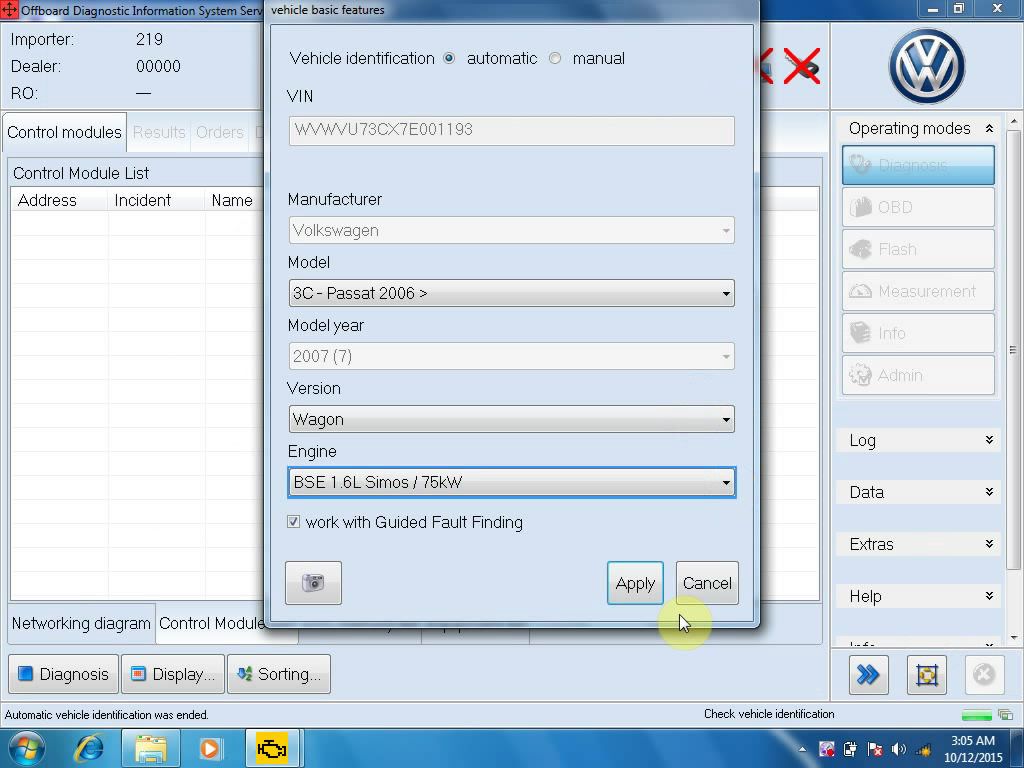
3C-Passat 2006 Diagnose by Newest VAS 5054A V2.26

This is the case we successfully tested on 3C-Passat 2006 with the latest ODIS 2.26 for VAS 5054A.
Computer requirement:
Windows XP/ Wind 7 System
Steps:
Open Offborad Diagnostic Information System on Desktop
Read Warnings, and then scroll down it and click OK.
Click the last line Starting diagnosis.

Check if the ignition is switched on in the vehicle. Click Continue.
Finish the vehicle basic feature. Click Apply.
Select the first line and click No RO.

Click Networking diagram, then click the content.
Click continue to enter diagnosis.


Click MOT_O1.

Click Control Module List

Click DTC memory to read, and click the first line”Engine Control Module 1”, then Diagnosis.

Click Yes to cancel diagnostic entrance.
Click the cross button under the operating modes.
Click Yes to end.
Done.
Ps. The latest software ODIS 2.26 only compatible with the following 5054A:
Best Quality VAS 5054A

2015年10月14日星期三

Newest VAG Scanner VAS 5054A ODIS V2.26 Released!!

Hello, all!! Here comes the newest version of VAS 5054A ODIS 2.26. This is a detailed introduction of 5054A 2.26.


What’s new in VAS 5054A V2.26?
- Estimated remaining times are shown for ECU flash operations.
- Diagnostic protocol contains interruptions of GFF sessions, extended measurement values, improved ECU communication view, used diagnostic hardware, connection type of diagnostic hardware, operating system, the hotfix used and submissions of support requests
- The measured value display has been improved.
- Documents in GFF are displayed in separate windows.
- One message box will be shown at the beginning of the test drive mode.
- GFF hotfixes can be integrated during diagnostic sessions.
- Danger messages have been revised.
- Stopping of diagnostic sessions may be interrupted.
- Automatic deletion of autosave diagnostic protocols after successful transmission.
- Selection of PassThru diagnostic hardware has been improved.
- ODIS Service Software update has been stabilized.

Which 5054A device available for ODIS 2.26?
sp33-c(Best Quality VAS 5054A ODIS V2.0 / V2.02)


VAS 5054A V2.26 ODIS for VW Audi Seat Skodasoftware display:


 5054A PCB board:

2015年9月27日星期日

2015 New VAS 5054a Plus ODIS 2.0 with original HQ PCB

2015 VAG diagnostic scanner VAS 5054 Plus with HQ chip and original 5054a case are available in obdtool.co.uk. The new VAS5054a plus share the same software with vas 5054a Bluetooth, but differs in outlook and PCB board.

Difference vas 5054a and 5054 plus:

1) Vas5054a case/outlook


New VAS5054a Plus


2) PCB board differences:

Vas 5054a PCB board
SP33-C Blue PCB


SP33-B/SP33-BO Green PCB


New VAS 5054 Plus PCB board
Green HQ PCB
A-board: SP33-E3/SP33-E4 Bluetooth (OEM 2.0) chip, less stable
B-board: SP33-E/SP33-E1 High Quality Bluetooth (AMB 2300) chip, more stable


Software version:
ODIS 2.0 Multi-Language:
English/Japanese/Portuguese/Romanian/Korean/Dutch/Polish/Turkish/Spanish/French/Italian/Croatian/Danish/German/Swedish/Finnish/Slovenian/Czech/Russian/Greek/Chinese
ODIS 2.02 English/Chinese

Supported Multi-brand Car Models: For VW, AUDI, SKODA, SEAT, Bentley and Lamborghini

Connection: USB or Bluetooth connection

Computer requirement:
Windows System Language: American English
Windows XP (XP2/XP3)
System C:// have to be NTFS format
C:// need to have at least 40GB space for installing ODIS V2.0

 We can also offer free software V19 VAS, if you need, choose software V19 when ordering. V19 VAS Software can support the J1850 PWM protocol.

WIFI Version VXDIAG VCX NANO 5054 ODIS V3.03 Support UDS protocol et le français